Scan OBD2 codes.
Save the record.
Plug in a compatible ELM327 OBD2 adapter while parked. Scan codes, save the record, and bring it to a mechanic.
Three steps. Start while parked.
Plug in an adapter
Connect a compatible ELM327 OBD2 adapter. Follow the adapter and phone prompts while the vehicle is safely parked.
Run a scan
Tap Scan while parked. Axlyne reads supported generic trouble codes reported by the car. Coverage varies by vehicle and adapter.
Save the record
Save the code, reported status, scan time, and car. Share the record with a qualified mechanic. Axlyne does not diagnose faults.
Ask about the record.
Axlyne AI reads the scan you already saved and answers in plain language. It cites the saved record fields it uses and prepares questions worth asking a qualified technician. It does not diagnose the fault.
Requires sign-in, Pro, a saved vehicle, internet access, and current service availability.
You: What did this scan record?
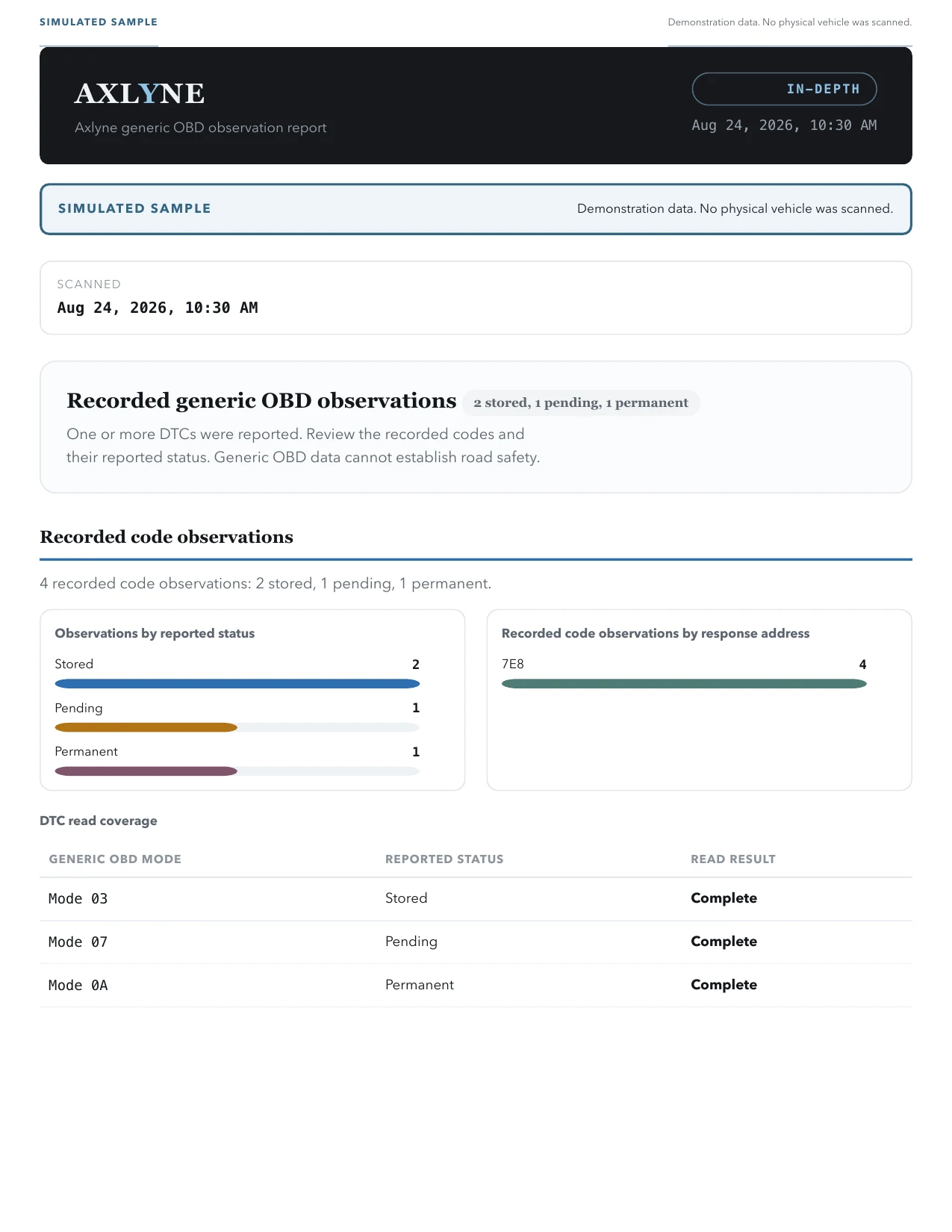
Axlyne AI: P0420 was reported as a stored generic OBD2 code at 9:41 AM. The record does not identify the failed part or say whether the car is safe to drive.
You: What should I bring to a shop?
Axlyne AI: Share the selected vehicle, reported code and status, scan time, and connection source. A qualified technician still needs to test the cause.
Scan records and live gauges, with clear limits.
Exact status from the scan.
Axlyne preserves the generic code, reported status, scan time, and selected vehicle. It does not convert those facts into severity or driving advice.
Mileage records in one place.
Start and stop foreground GPS recording yourself, or enter mileage manually. Choose a business or personal label and export PDF and CSV records. Axlyne does not determine tax eligibility.
Every car you own, one place.
Vehicle profiles keep service history, expenses, and scan records tied to the selected vehicle. Unlimited vehicles on Pro.
Read-only live gauges on your phone.
After Axlyne verifies that the connected vehicle VIN matches the selected vehicle, Drive and HUD show supported standard Mode 01 values on your phone. Switch speed between MPH and KM/H. Axlyne sends no control commands and does not save live samples. Axlyne does not support Android Auto or CarPlay.
- VIN-bound
- Read-only Mode 01
- Phone Drive
- Phone HUD
- MPH / KM/H
- Not saved
Start free. Add Pro for Axlyne AI, reports, and unlimited vehicles.
Core scans and mileage records.
- Read confirmed & pending codes
- Preserve reported code status
- GPS + manual mileage tracking
Axlyne AI · Pro: Ask about the record.
Requires sign-in, Pro, a saved vehicle, internet access, and current service availability.
Full Pro access, billed monthly.
Full Pro access, billed annually.
- Everything in Free
- Source-labeled scan reports
- Maintenance reminders by date or mileage
Current local prices appear in the app store before purchase. Subscriptions auto-renew until canceled in the store where purchased. Cancellation timing follows that store's terms.
What Axlyne includes.
Scan records, mileage tools, maintenance records, and compatibility details.
What Axlyne includes.
Scan records, mileage tools, maintenance records, and compatibility details.
Scan records
- Read confirmed & pending codes
- Preserve reported code status
- Generic code identity
- Source-labeled scan reports
- Connection and adapter context
- Per-vehicle scan history
- Reported standard generic OBD2 codes
- Record scan time with its source
Log
- GPS trip tracking
- Business / personal classification
- PDF + CSV mileage reports
- Vehicle expenses
- Vehicle records
- Service history
- Scan history
Care
- Reminders by date or mileage
- Care records and scheduled reminders
- Due-date and mileage alerts
- Adapter requirement disclosure
- Adapter and connection history
- In-app languages: EN · ES · 中文 · 日本語 · हिन्दी · العربية
Know when to call a mechanic.
Axlyne records what the vehicle reports. A qualified mechanic finds the cause and handles the repair.
It won't fix your car
Axlyne records supported generic OBD2 observations. A qualified mechanic determines the cause and repair.
It won't replace a mechanic
For deep drivetrain, transmission, and electrical work, get a professional. Bring our report.
Coverage varies by vehicle
Manufacturer-specific PIDs differ. Compatibility and data depth depend on the vehicle protocol, adapter firmware, phone transport, and what the ECU exposes.
Adapter and phone connection requirements.
Axlyne uses the standard ELM327 protocol. A working connection depends on the vehicle protocol, the connection method supported by the phone and adapter, and the data the vehicle exposes.
Bluetooth LE or Wi-Fi
Apple restricts Bluetooth Classic to MFi hardware, so on iPhone you'll need a BLE (Bluetooth Low Energy) or Wi-Fi OBD2 adapter.
BLE, Wi-Fi & Classic
Android can also use Bluetooth Classic when the phone, adapter, and vehicle connection support it, alongside BLE and Wi-Fi.
Will it work with my car?
Those model-year rules generally indicate an OBD2 port, not guaranteed compatibility. Connection and available data depend on the vehicle, adapter, phone, and what each control unit exposes. Axlyne records only supported standard responses observed during the current scan.
Clear OBD2 guides, from adapter to repair.
Read the latest source-backed explainers in the Axlyne Blog, then open the adapter and repair guides when you need the next step.
Axlyne store availability.
Check each verified store listing below. Axlyne requires a compatible ELM327 OBD2 adapter, sold separately.
Do I need to buy an adapter?
Yes. Axlyne is software and requires a compatible ELM327 OBD2 adapter. Confirm that the adapter connection method and vehicle protocol work with your phone and vehicle. Axlyne does not recommend or rank adapter models.
Does it work with Android Auto or CarPlay?
No. Drive and HUD run only inside Axlyne on your phone. Axlyne does not support Android Auto or CarPlay. Connect and finish setup while safely parked, and never handle the phone while driving.
Do you sell my data?
No. We do not sell vehicle data. Scan records stay on your device by default. If you start Axlyne AI, your device sends the visible chat thread and a bounded saved-record packet to Axlyne’s managed service at https://ai.axlyne.com/v1/ai/chat. The service validates the request and renders the answer. OpenRouter is the only external model processor enabled for this release. It receives only the intent, language, constant category choices, and allowed layouts, never your message or vehicle record. The direct GLM route is disabled. AI chat does not diagnose faults. See the Privacy Policy for details.
Can I clear the check-engine light?
No. The current release records reported codes and does not enable code clearing. Use qualified service equipment and follow its safety instructions.
What languages does the app speak?
The app itself runs in English, Spanish, Chinese, Japanese, Hindi, and Arabic — and this site speaks 14.
What if my car isn't fully supported?
OBD2 model-year rules indicate a standardized port, but compatibility and data depth vary by vehicle protocol, adapter, phone, and the data each control unit exposes. Axlyne records only supported standard responses observed during the current scan.